
FAQ TBarCode OCX
Distorted Barcode Output, Black Bar at the Top
Distorted Barcode Output, Black Bar at the Top
If this occurs during printing, this effect is caused by the printer driver. Along other printer models this effect happens with Toshiba TEC, Honeywell and DataMax printers.
If this occurs during bitmap generation, this effect is caused by the screen driver.
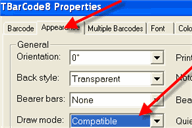
The solution is to change the draw mode of TBarCode:
TBarCode V8+
Set the ActiveX Property DrawMode to Compatible.
TBarCode V7+
- Create a file barcode.ini with the following content:
- Copy the barcode.ini file to the installation directories of TBarCode (32-bit and 64-bit), where you can find the files tbarcode*.ocx or tbarcode*.dll.
- Restart the program.
[DRAW_MODE]
UseGDIRect=1