
FAQ: TBarCode Office Excel Add-In
Scaled or Cropped EMF Barcodes with Remote Desktop
Scaled or Cropped EMF Barcodes with Remote Desktop
Problem
If you connect to a PC through Remote Desktop, the EMF barcodes may look scaled or cropped after updating the bar codes. The problem occurs if you have scaled the size of text, apps and other items, that means the scaling in the Display Settings is set to 125% or higher.
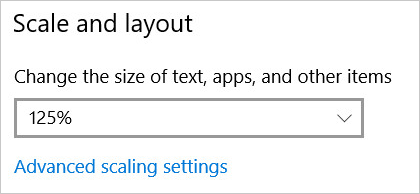
Example for a scaled size, which triggers the problem.
Workaround
In order to fix the EMF bar code scaling, enable the following setting in Windows 10:
- Right click on the desktop and select Display Settings.
Alternatively open the Settings app, go to the System group of settings, then select the Display tab. - Scroll down to the Scale and layout section and click Advanced scaling settings.
- On the following screen, below “Fix scaling for apps”, enable the Let Windows try to fix apps so they are not blurry switch:
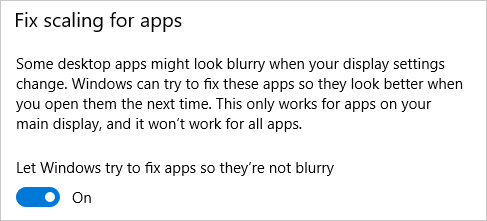
After that restart Excel (or Word) and refresh the bar codes in your document: Press SHIFT + Refresh in the add-in panel to force a refresh of all bar codes.