
FAQ Barcode Creation
How Do I Create a GS1 DataMatrix According to EU FMD (Serialization)?
How Do I Create a GS1 DataMatrix According to EU FMD (Serialization)?
For prescription medicine packaging, there are new imitation protection guidelines, which is called EU Falsified Medicine Directive (EU FMD, 2011/62/EU). According to delegated regulation 2016/161/EU the products are identified by a 2D barcode and contain a unique product number as well as other security features.
Encoded Product Features
The following product features are encoded in the GS1 DataMatrix:
- AI (01) - GTIN or NTIN,
- AI (17) - Expiration date (YYMMDD)
- AI (10) - Batch number (up to 20 characters, alphanumeric)
- AI (21) - Serial number (up to 20 characters, alphanumeric)
- AI (710 to 714) - NHRN (national refund number) if required by the EU member state
The data string for the Data Matrix consists of:
01 + NTIN (14 digits) + 17 + Expiration Date (6 digits) + 10 + lot number + \F + 21 + serial number
Example (without NHRN):
0104150103893583171714112010KMB11205201\F21CEB630078700
The data is entered as a continuous string (must also be imported later in the same way).
Barcode Settings
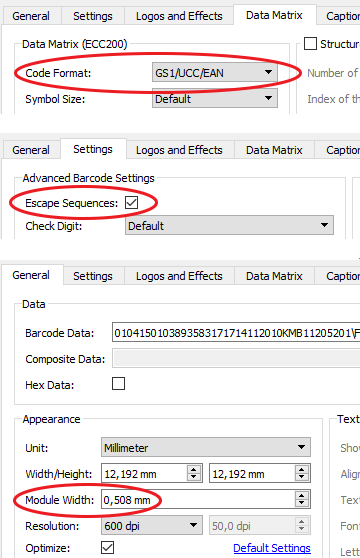
The following barcode parameters have to be configured (see pictures):
- Barcode type = Data Matrix
- Data Matrix code format = GS1/UCC/EAN
- Escape sequences = On
- Module width (dot size): 0.508 mm
You can find a preconfigured Barcode Studio BC file here.
Related Links:
- Overview FMD and serialization (GS1 Austria)
- The randomized serial number is unique and protects against imitations:
- Encoding rules for serial number (Austria)
- Encoding rules for serial number (Germany) - FMD GTIN / NTIN Transition