
FAQ Barcode Creation
How is the Bar Width Reduction Applied to a 2D Matrix Code?
How is the Bar Width Reduction Applied to a 2D Matrix Code?
In Standard Mode, the bar width reduction is applied to each side at 50% of the desired total reduction. If you want to apply the reduction only to the bottom and right side of the matrix dot, use the Legacy Options as shown below.
Standard Mode (Default)
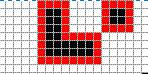
- 4 Pixel / module
- Bar width reduction = 50% → 2 Pixel
- Options: No legacy option set
- We reduce 1 Pixel at each side of a dot or a connected line of dots.
Note: If you adjust a BWR of 25% at 4 Pixel module width (⇒ 1 Pixel reduction), the module would be “shaved” ½ Pixel at each side. Because you can draw only full Pixels, this combination cannot be drawn correctly.
Legacy Mode 1
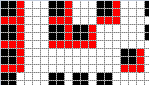
- 3 Pixel / module
- Bar width reduction = 33% → 1 Pixel
- Options: DRAW_BarWidthReduction_Legacy=1
- We reduce 1 Pixel at right and bottom of each dot, also of connected dots.
Legacy Mode 2
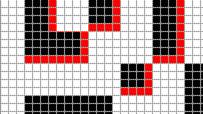
- 4 Pixel / module
- Bar width reduction = 25% → 1 Pixel
- Options: DRAW_BarWidthReduction_Legacy=2
- Connected dots are not reduced.
- We reduce 1 Pixel at right and bottom of each dot or connected line of dots.